
Unlock iPhone 3G on 4.0.2 Firmware
What you will need to download (click on text to be redirected):
- iPhone iOS 4.0 (Make sure it is iOS 4.0 not 4.0.2)
Note: Make sure you have iTunes 9.2 installed.
 Jailbreak
Step One: Upgrade to iOS 4.0.2 through iTunes.
Step Two: After upgrade is complete close iTunes, and run Red Snow
Step Three: Point Red Snow to the iOS 4.0 firmware (Make sure it does not point it to 4.0.2)
Step Four: Check “Install Cydia”
Step Five: Follow the Instructions and wait till red snow has finished its work.
Unlock
Step One: Open Cydia and Search for Ultrasn0w
Step Two: Install Ultrasn0w
Step Three: Reboot your iPhone 3G
Follow Up: You tube Fix
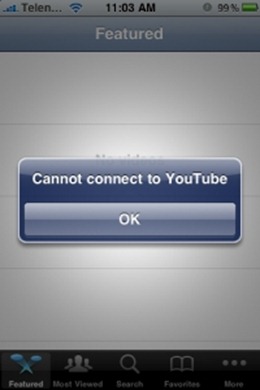
Once you have Jailbreaked and Unlocked your iPhone 3G you will notice that you tube will notify you that it “cannot connect to youtube”.
- Open Cydia.
- Click on More Packaged from the main screen.
- Install the “iPhone Modding” package.
- Search for PushFix
- Install PushFix
- Respring or reboot and your youtube should be up and running :)
No comments:
Post a Comment